
Review requests
Every request from a member waits on Review until an admin decides. Your own requests skip it unless they look like a duplicate.
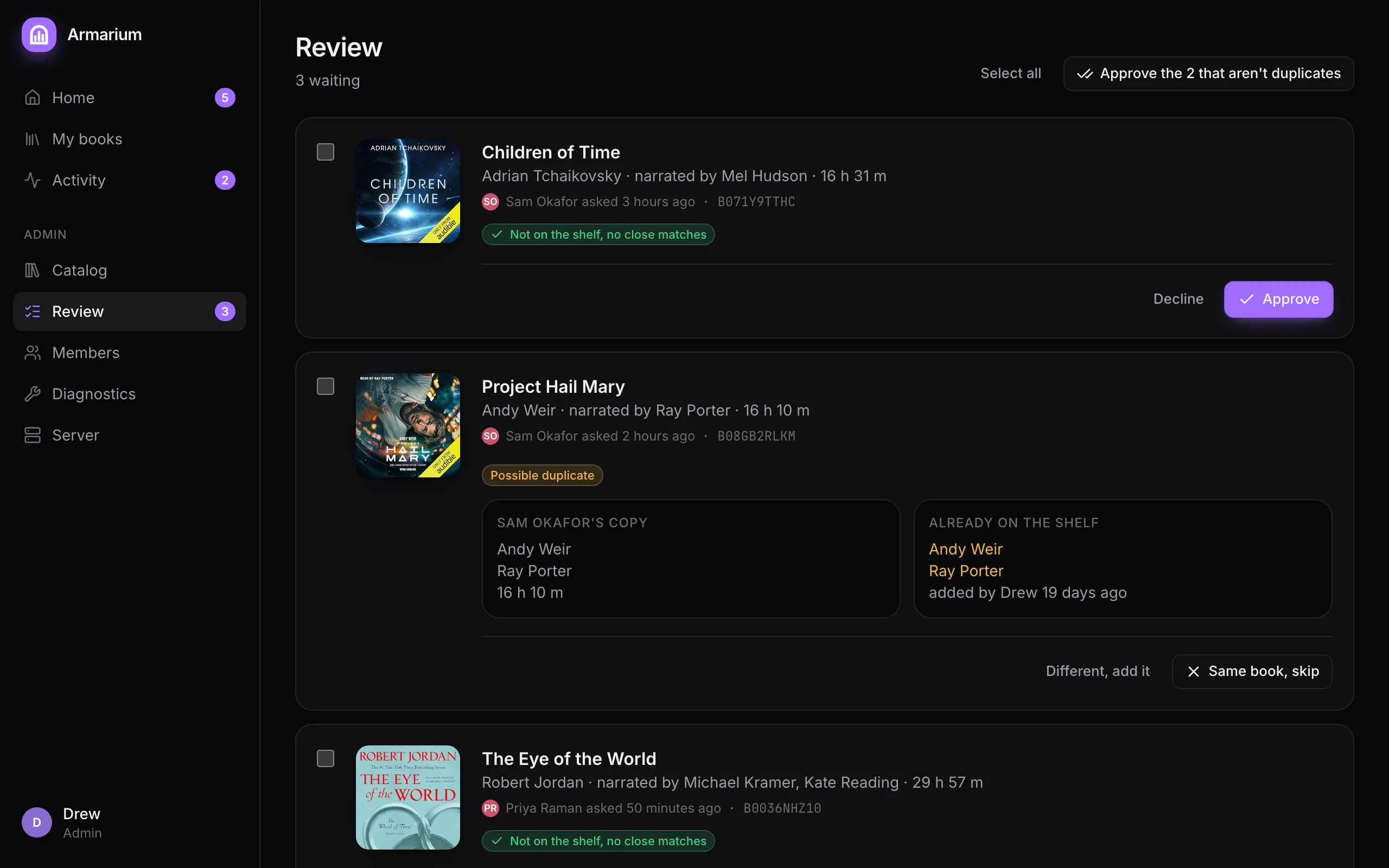
Each card shows the book, who asked and when, and what the duplicate check found:
- Not on the shelf, no close matches: Approve queues the download; Decline turns it down.
- Possible duplicate: Audiobookshelf already has a book with the same title, first author and first narrator but a different ASIN, usually another edition of the same recording. The two are compared side by side, with matching author and narrator highlighted. Same book, skip declines it; Different, add it approves it.
Exact matches (same ASIN) never reach this page: they’re marked On shelf at once.
Many at a time
Section titled “Many at a time”Tick the checkbox on several cards, or Select all, then Approve or Decline them together. Approve the N that aren’t duplicates approves every plain request in one go and leaves the possible duplicates for you to look at.
Declining is sticky
Section titled “Declining is sticky”A declined book stays declined: if the member asks again, nothing comes back to Review. To change your mind, find the book in the Catalog and Pull it.
Getting pinged
Section titled “Getting pinged”With notifications on, Discord gets a message when requests are waiting, at most once an hour and only when the list has changed. Home shows them under Needs you.